javascript prototypes, ES5 & Tricks By albro
In this post, I'll talk about a concept that may be overlooked by most beginner and sometimes professional programmers: prototypes. Then I'll introduce some methods in ECMAScript 5 because they're very useful.
What is a prototype?
In fact, all JavaScript objects inherit their methods and properties from a prototype. These prototypes, as their name suggests, are prototypes and outlines for a class of objects.
In the previous session, I talked about object constructors and gave you the following example:
<!DOCTYPE html>
<html>
<body>
<h2>JavaScript Objects</h2>
<p id="demo"></p>
<script>
function Person(username, rc, age, eye) {
  this.username = username;
  this.rc = rc;
  this.age = age;
  this.eyeColor = eye;
}
var myFriends = new Person("ocdb", 100, 5, "blue");
var myLove = new Person("leo.voter",100,48,"green");
document.getElementById("demo").innerHTML =
"My Friend is " + myFriends.age + ". My love is " + myLove.age;
</script>
</body>
</html>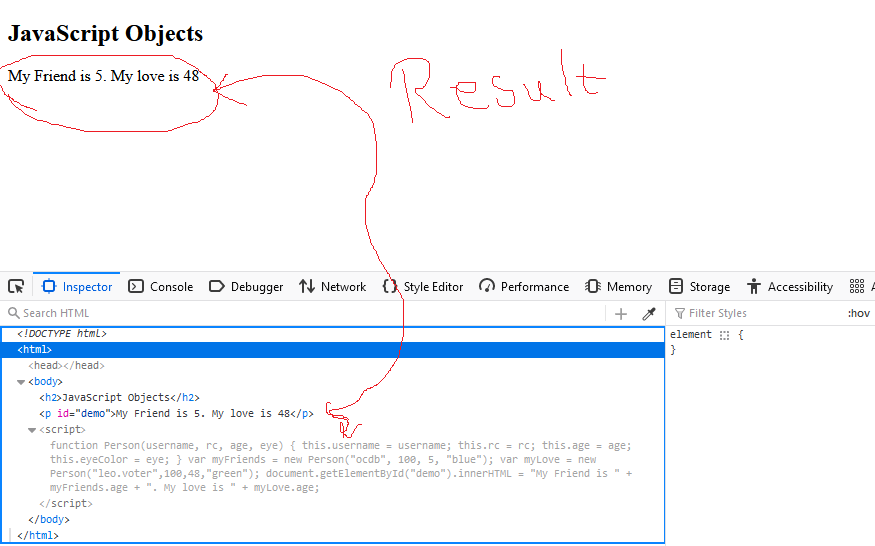
We cannot add our desired properties to the constructor, and the following code was incorrect:
Person.nationality = "English";Rather, we should have added it manually to the constructor function itself:
function Person(username, rc, age, eye) {
  this.username = username;
  this.rc = rc;
  this.age = age;
  this.eyeColor = eye;
  this.nationality = "English";
}
Inherit from prototype
All JavaScript objects inherit their methods and properties from a prototype, but we did not specify which prototype:
-
Datesinherit fromDate.prototype. -
Arraysinherit fromArray.prototype. -
Persons(the same as our example) inherit fromPerson.prototype.
So the general rule is that an object inherits from Object.prototype.
Examples of using prototype
Now that we have learned about the prototype, you should know that we can access the constructor function through it.
In this example, I want to use prototype to create a new property that did not exist in our object.
<!DOCTYPE html>
<html>
<body>
<h2>JavaScript Objects</h2>
<p id="demo"></p>
<script>
function Person(username, rc, age, eye) {
  this.username = username;
  this.rc = rc;
  this.age = age;
  this.eyeColor = eye;
}
Person.prototype.nationality = "English";
var myFriends = new Person("ocdb", 100, 5, "blue");
document.getElementById("demo").innerHTML =
"The nationality of my friend is " + myFriends.nationality;
</script>
</body>
</html>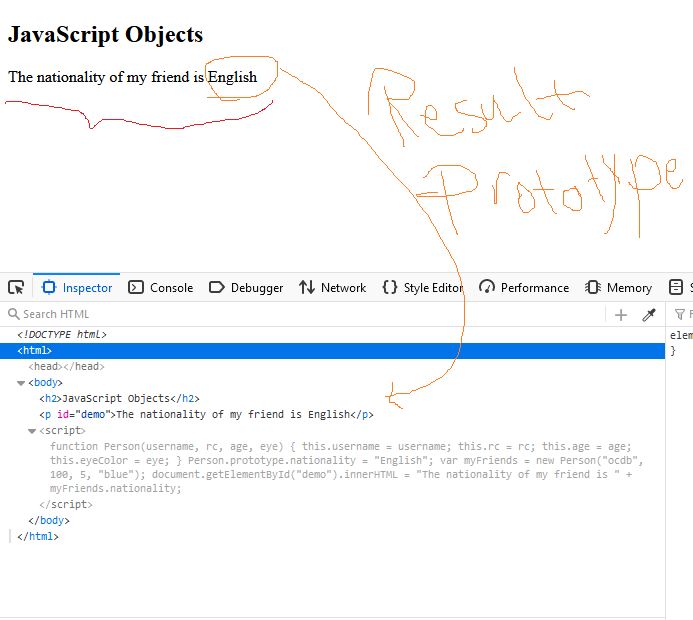
As you can see, I easily added the nationality attribute.
I do the same to add methods:
<!DOCTYPE html>
<html>
<body>
<h2>JavaScript Objects</h2>
<p id="demo"></p>
<script>
function Person(username, rc, age, eye) {
  this.username = username;
  this.rc = rc;
  this.age = age;
  this.eyeColor = eye;
}
Person.prototype.details = function() {
  return this.username + " RC = " + this.rc
};
var myFriends = new Person("ocdb", 100, 5, "blue");
document.getElementById("demo").innerHTML =
"The details of my friend is " + myFriends.details();
</script>
</body>
</html>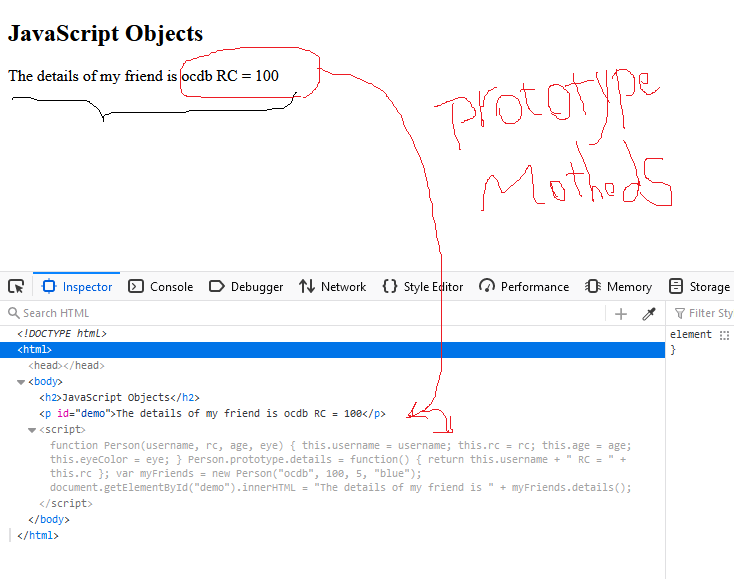
Warning: only change your own prototypes! Do not touch JavaScript's default prototypes and its standard objects, because the whole program will be messed up.
ECMAScript 5 methods
In ECMAScript 5, methods for working with objects were introduced. I want to say the most important ones here:
// Add or change a property of an object
Object.defineProperty(object, property, descriptor)
// Add or change several properties
Object.defineProperties(object, descriptors)
// Accessing properties
Object.getOwnPropertyDescriptor(object, property)
// Return all properties as an array
Object.getOwnPropertyNames(object)
// Return numeric properties in the form of an array
Object.keys(object)
// access the prototype
Object.getPrototypeOf(object)
// Denying permission to add properties to an object
Object.preventExtensions(object)
// Returns true if we are allowed to add properties to an object
Object.isExtensible(object)
// Denies the permission to change the properties themselves (and not the values).
Object.seal(object)
// Returns true if we are not allowed to add properties to an object
Object.isSealed(object)
// Prevents any changes to the object
Object.freeze(object)
// Returns true if we are not allowed to make changes to the value of the object
Object.isFrozen(object)
Changing the value of a property
The general structure of the code is as follows:
Object.defineProperty(object, property, {value : value})Example:
var person = {
  username : "leo.voter",
  rc : "90",
  language : "EN"
};
// Change a property
Object.defineProperty(person, "language", {value : "NO"});
Change metadata
The metadata change is as follows:
writable : true      // The value of the properties can be changed
enumerable : true    // Properties are countable
configurable : true  // Properties can be configured and adjusted.
We also have a False value for each of them, which will be the opposite of the above explanation.
Get all the properties
To get all the properties of an object, I can do this:
var person = {
  username : "leo.voter",
  rc : "90",
  language : "EN"
};
Object.defineProperty(person, "language", {enumerable:false});
Object.getOwnPropertyNames(person);  // Returns an array of all properties
Definition of Getter and Setter
In the previous parts, I talked about Getter and Setter, but you should know that you can also define them with Object.defineProperty():
// Create an object
var person = {
  username : "leo.voter",
  rc : "90",
  language : "EN"
};
// Define a getter
Object.defineProperty(person, "details", {
  get : function () {return this.username + " RC = " + this.rc;}
});
I hope you enjoyed this post. If you liked this post, don't forget to upvote!
[Hive: @albro]






Comments